![[Apple MFi Certified] Air-Tags Bluetooth Tracker with Apple Find My for iPhone Users
| [Apple MFi Certified] Air-Tags 5](https://m.media-amazon.com/images/I/416vz-sJqcL.jpg)
![[Apple MFi Certified] Air-Tags Bluetooth Tracker with Apple Find My for iPhone Users
| [Apple MFi Certified] Air-Tags 5](https://m.media-amazon.com/images/I/51R0ENXsAwL.jpg)
![[Apple MFi Certified] Air-Tags Bluetooth Tracker with Apple Find My for iPhone Users
| [Apple MFi Certified] Air-Tags 5](https://m.media-amazon.com/images/I/51yTkDsw3bL.jpg)
![[Apple MFi Certified] Air-Tags Bluetooth Tracker with Apple Find My for iPhone Users
| [Apple MFi Certified] Air-Tags 5](https://m.media-amazon.com/images/I/51QB-jYvEcL.jpg)
![[Apple MFi Certified] Air-Tags Bluetooth Tracker with Apple Find My for iPhone Users
| [Apple MFi Certified] Air-Tags 5](https://m.media-amazon.com/images/I/41x8khAWv+L.jpg)
![[Apple MFi Certified] Air-Tags Bluetooth Tracker with Apple Find My for iPhone Users
| [Apple MFi Certified] Air-Tags 5](https://m.media-amazon.com/images/I/41ZieYuF5OL.jpg)
![[Apple MFi Certified] Air-Tags Bluetooth Tracker with Apple Find My for iPhone Users
| [Apple MFi Certified] Air-Tags 5](https://m.media-amazon.com/images/I/416vz-sJqcL.jpg)
![[Apple MFi Certified] Air-Tags Bluetooth Tracker with Apple Find My for iPhone Users
| [Apple MFi Certified] Air-Tags 5](https://m.media-amazon.com/images/I/51R0ENXsAwL.jpg)
![[Apple MFi Certified] Air-Tags Bluetooth Tracker with Apple Find My for iPhone Users
| [Apple MFi Certified] Air-Tags 5](https://m.media-amazon.com/images/I/51yTkDsw3bL.jpg)
![[Apple MFi Certified] Air-Tags Bluetooth Tracker with Apple Find My for iPhone Users
| [Apple MFi Certified] Air-Tags 5](https://m.media-amazon.com/images/I/51QB-jYvEcL.jpg)
![[Apple MFi Certified] Air-Tags Bluetooth Tracker with Apple Find My for iPhone Users
| [Apple MFi Certified] Air-Tags 5](https://m.media-amazon.com/images/I/41x8khAWv+L.jpg)
![[Apple MFi Certified] Air-Tags Bluetooth Tracker with Apple Find My for iPhone Users
| [Apple MFi Certified] Air-Tags 5](https://m.media-amazon.com/images/I/41ZieYuF5OL.jpg)
Can't find your wallet? Simply play a sound on the Find My app, and you'll hear beeps indicating its location—whether it's under the couch, bed, or cushions. Even if it's not nearby, like at your office, a friend’s house, or an unfamiliar shopping mall, navigate to its location on the map using the tracker.
With the Find My app on your iPhone, tap the Play Sound button, and the tracker will beep loudly. The beeps, up to 100db, can be heard clearly even when the tracker is held down by thick blankets. This ensures you can locate it easily, even in tough conditions.
Pair your tracker with your iPhone effortlessly. Simply long press the function button on the tracker for 5 seconds until you hear a beep. Open the “Find My” app, enable Bluetooth, tap “Add Item,” select “Other Supported Item,” and click “Connect.” Confirm the prompt to complete the pairing quickly and hassle-free.
Our tracker has undergone rigorous testing and certification from authoritative institutions, ensuring reliable performance. With a self-discharge rate of less than 2%, it can maintain standby status for about 5-10 years, so you don’t have to worry about it failing when you need it most.
Activate and set your contact information in Lost Mode to receive instant alerts via the Find My app if the item is not found. If lost, others can obtain your contact information through NFC and get in touch with you, no additional fees required.
Assured data security. The tracker never stores your location data publicly. Location data is encrypted at every step, keeping your information private.
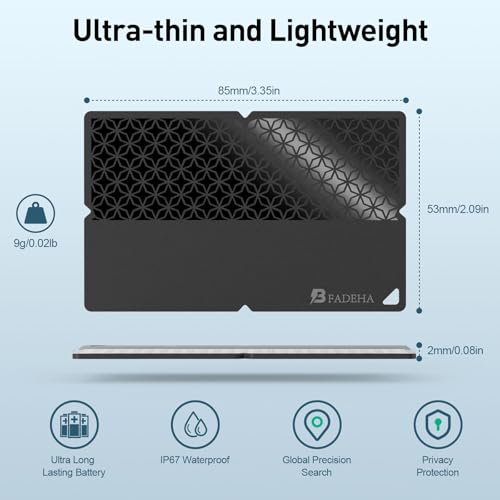
With an IP67 rating, the item wallet finder can withstand immersion in water up to 3 feet for 30 minutes. Ideal for outdoor activities, it confidently handles splashes, rain, and brief submersion.